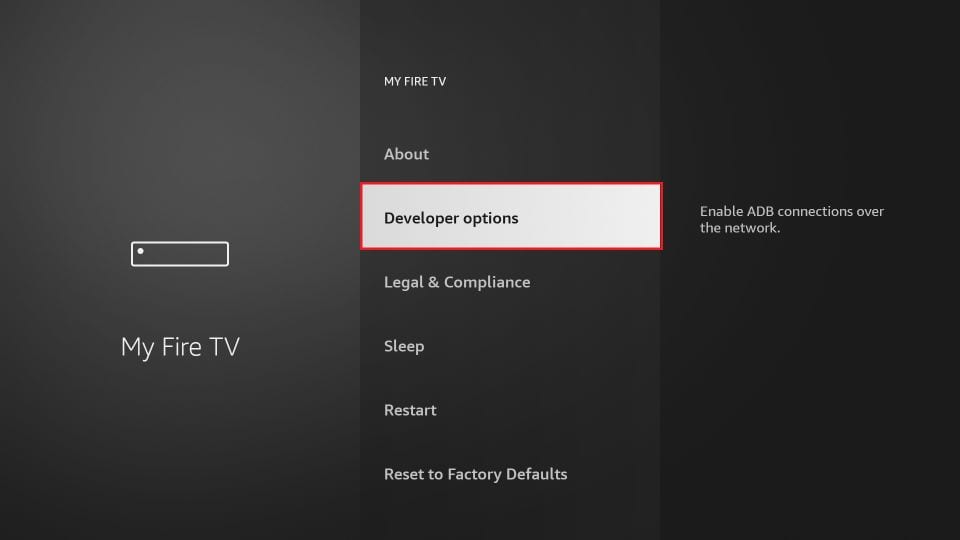
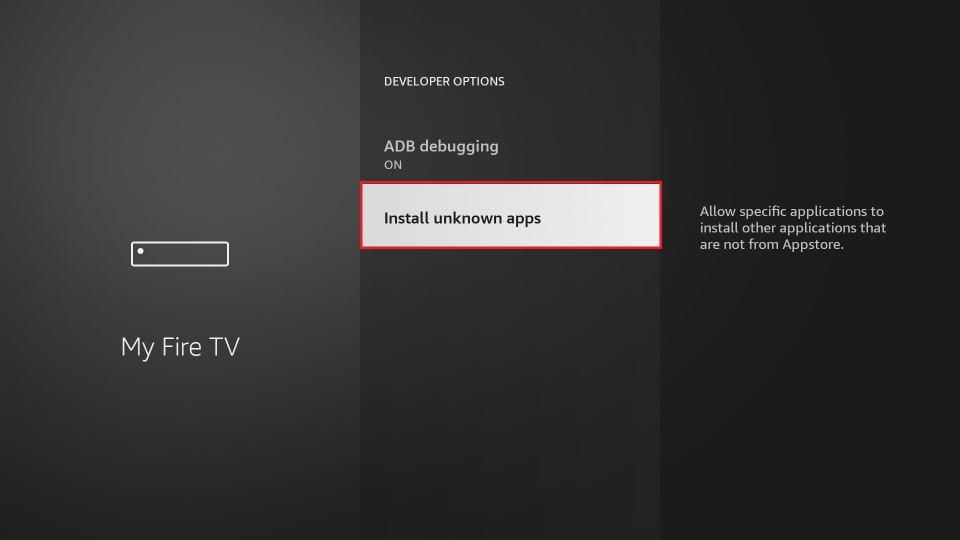
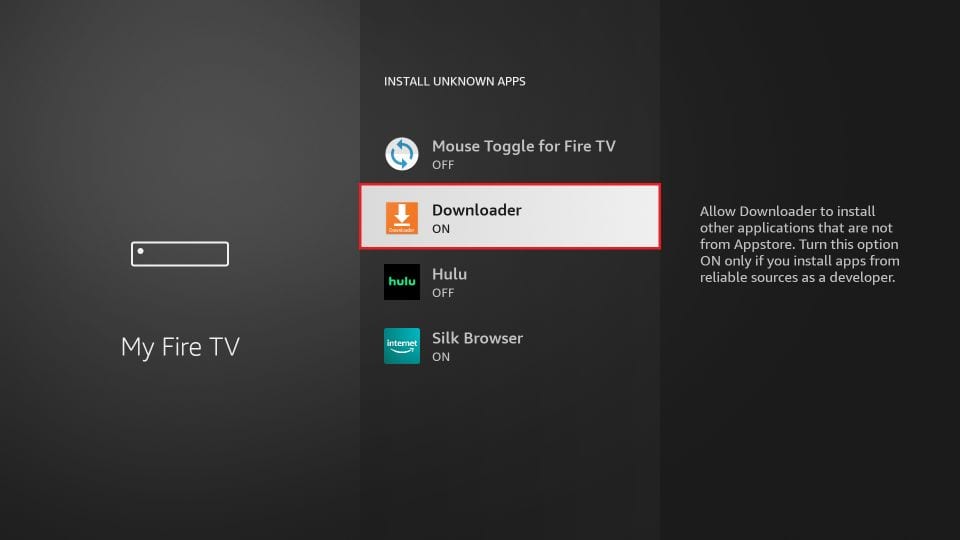
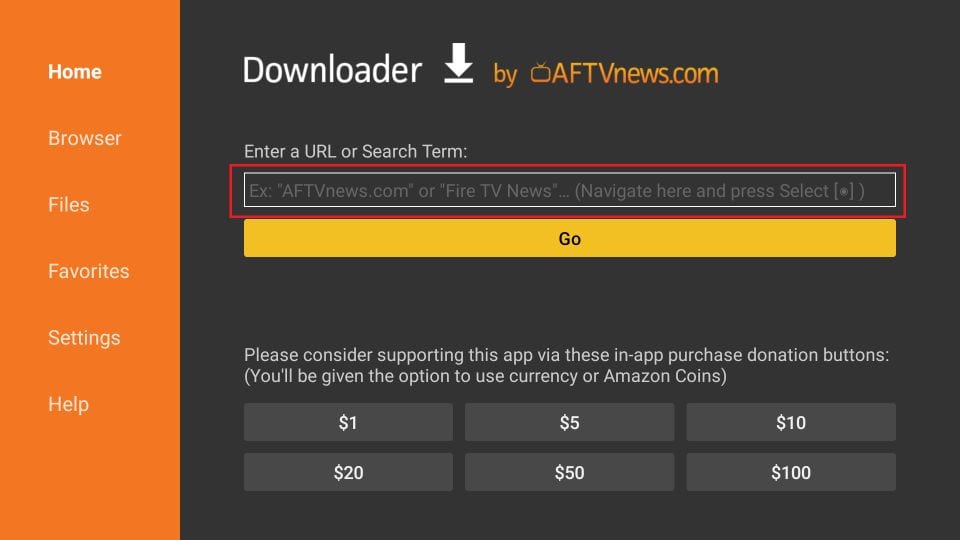
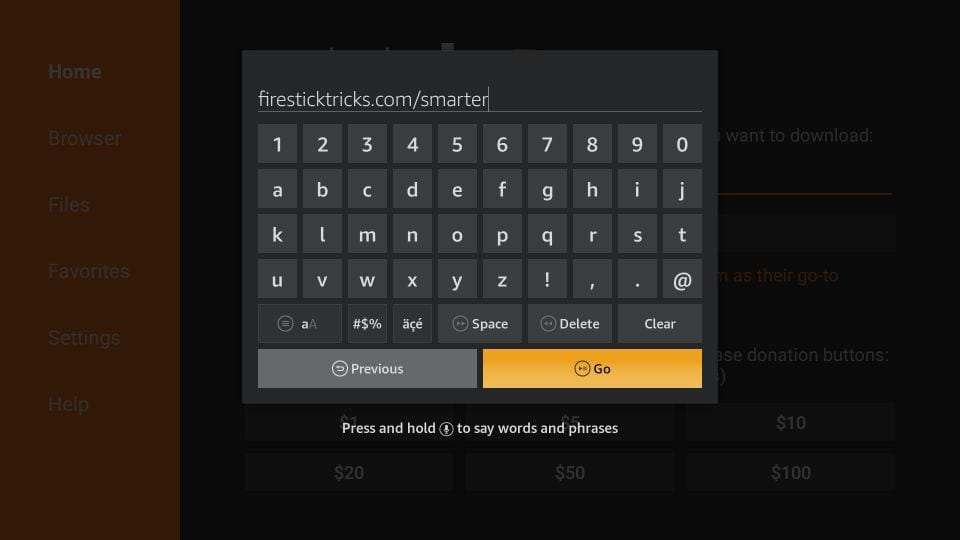
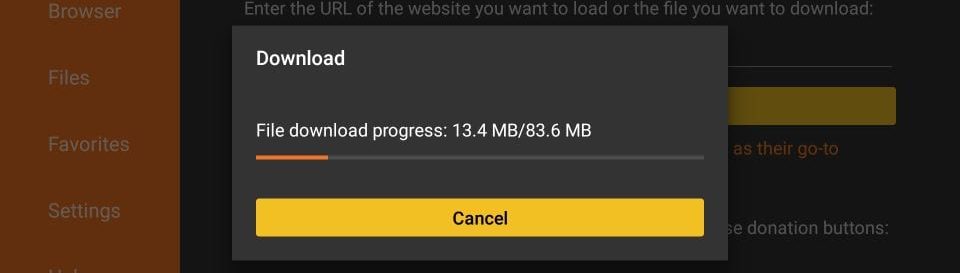
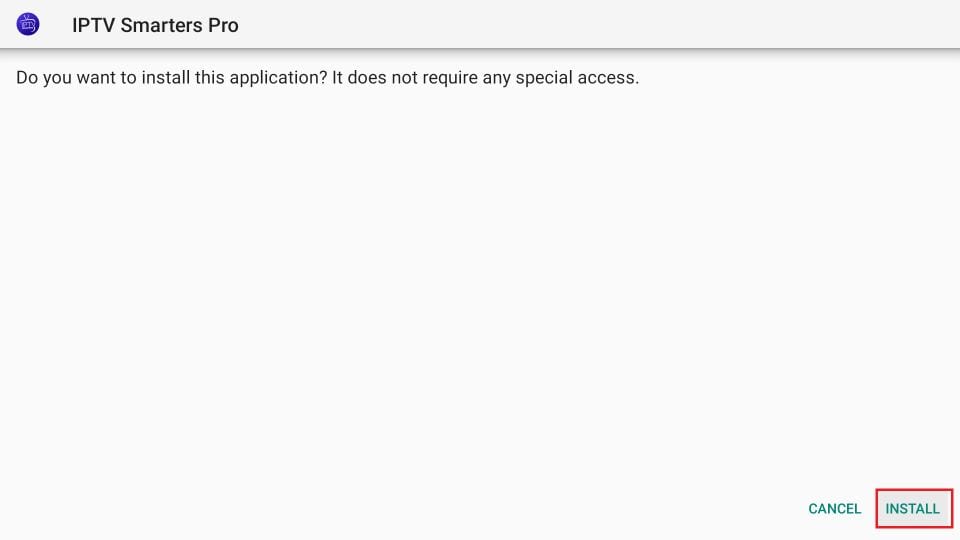
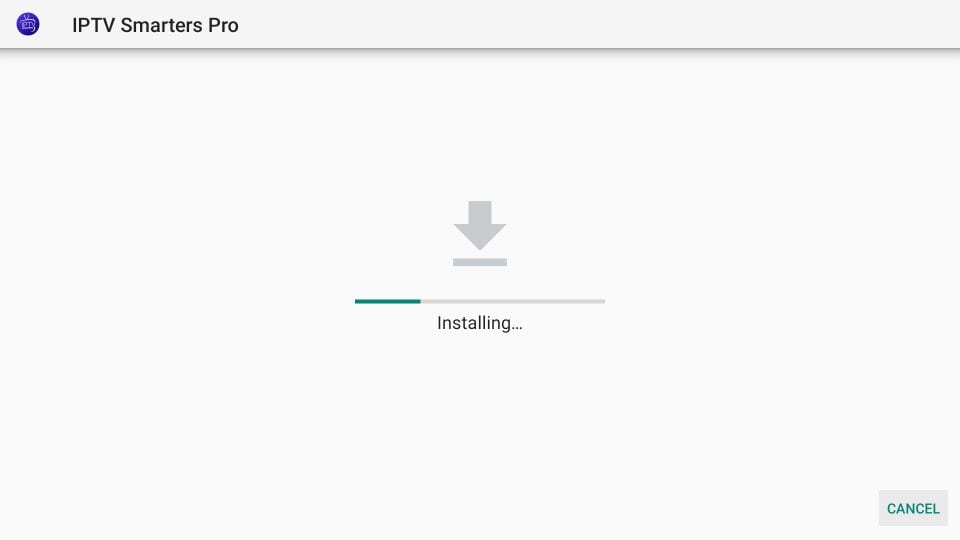
Step-by-step installation

Install Online-FlixTVOn Any Device

Ready in less than 5 minutes ยท 24/7 WhatsApp support ยท No technical knowledge required

๐Ÿ’ฌ Need help? We'll install it for you!

Our support team helps you for free via WhatsApp with the full installation โ€” step by step!

WhatsApp Support 24/7 ยท Free ยท Instant reply
1
Choose your device & download the app
Android
Smart TV
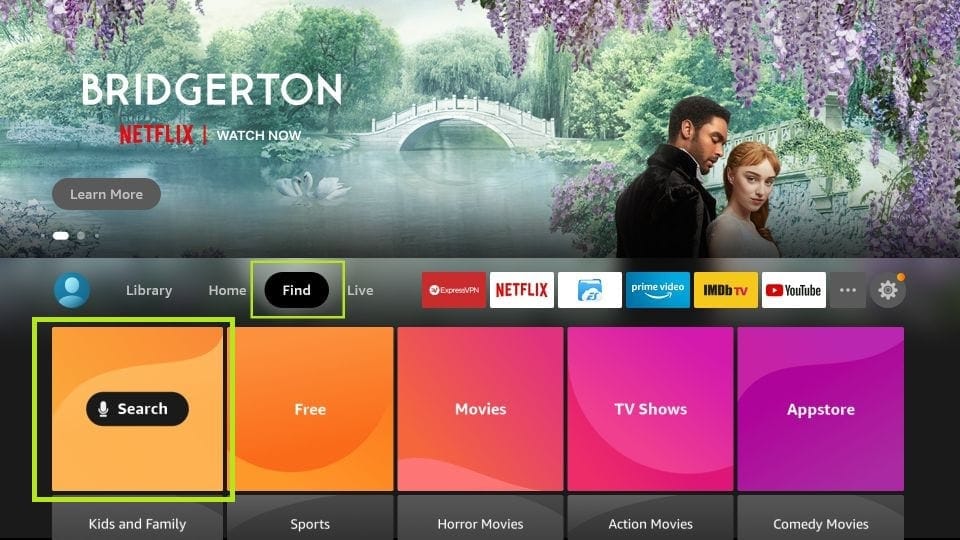
Fire TV Stick
Apple / iOS
Windows / Mac
MAG
Android Apps
โญ RECOMMENDED
IPTV Smarters Pro
Most popular IPTV app. Excellent EPG, easy Xtream Codes & M3U setup.
๐Ÿค– AndroidFree
โ†— Tap for download info
IBO Player
Clean interface, Xtream Codes & M3U. Fast and lightweight on all Android devices.
๐Ÿค– AndroidFree
โ†— Tap for download info
TiviMate
Premium IPTV app with sleek design, advanced EPG and catch-up TV support.
๐Ÿค– AndroidFreemium
โ†— Tap for download info
BOB Player
Modern interface, M3U and Xtream Codes support. Fast and stable on Android.
๐Ÿค– AndroidFree
โ†— Tap for download info
2
Set up the app โ€” choose your method
โš™๏ธ Choose setup method
After downloading the app, open it and choose one of the two methods below. Xtream Codes is the easiest and recommended method.
๐Ÿ”‘ Method 1: Xtream Codes (Recommended)
๐Ÿ“‹ Method 2: M3U Playlist
โœ…

Works with these apps:IPTV Smarters Pro, IBO Player, TiviMate, BOB Player

๐Ÿ“‹ What you need from Online-FlixTV:
๐ŸŒ
Server URL (Host)
Provided by us after activation
๐Ÿ‘ค
Username
Provided by us after activation
๐Ÿ”’
Password
Provided by us after activation
1
Open the IPTV app
Launch the app and tap "Add User" or "Login"
2
Select "Xtream Codes API"
Select Login with Xtream Codes API and fill in:
๐ŸŒ Server URL โ€” van Online-FlixTV
๐Ÿ‘ค Username โ€” van Online-FlixTV
๐Ÿ”’ Password โ€” van Online-FlixTV

Zie screenshot hieronder โ†’
IPTV Smarters login screen
3
Tap "Add User" / Save
Wait 10โ€“30 seconds while the channels load
4
Tap "Live TV" to start watching
Select LIVE for live channels, MOVIES for movies or SERIES for series

Zie screenshot hieronder โ†’
IPTV Smarters dashboard
5
Choose a channel and enjoy! โœ…
Select a channel group, pick a channel and tap fullscreen
๐Ÿ’ก

Pro TipMake sure there are no spaces before or after your username and password. Copy directly from our WhatsApp message!

๐Ÿ“‹

Works with all IPTV appsUse this method as an alternative to Xtream Codes.

๐Ÿ“‹ What you need from Online-FlixTV:
๐Ÿ”—
M3U Link (URL)
Long link โ€” provided by us after activation
1
Open the IPTV app
Tap "Add Playlist" of "Add Playlist"
2
Select "M3U URL"
Select the M3U URL option (not "Upload File") and paste your Online-FlixTV M3U link in the URL field
3
Tap Load / Save
Wait 30โ€“60 seconds โ€” 22,000+ channels load automatically
4
Done! Enjoy Online-FlixTV โœ…
Choose a channel and start watching in 4K Ultra HD
๐Ÿ’ก

Pro TipM3U links are long โ€” copy the full link from our WhatsApp message. Make sure you copy everything!

Fire TV Stick Apps
โญ RECOMMENDED
IBO Player
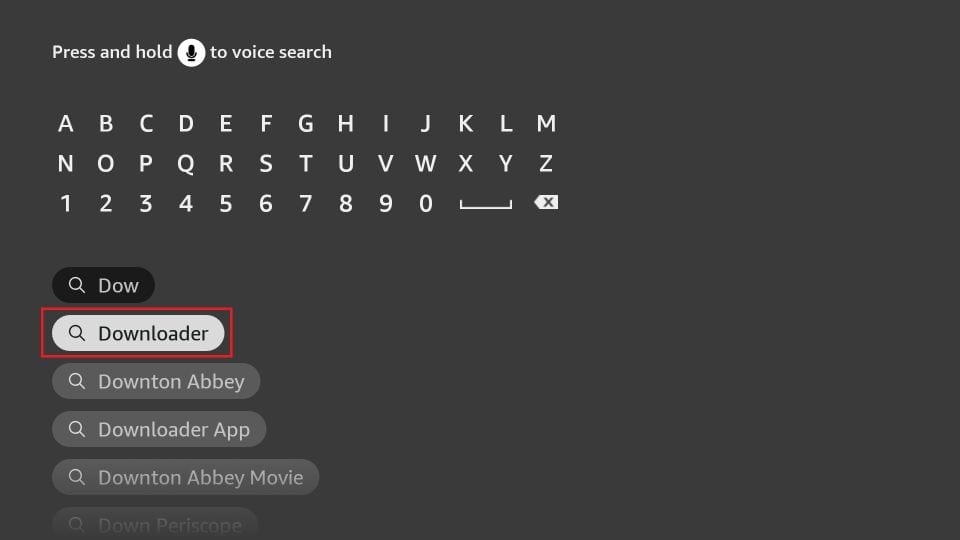
Best choice for Fire TV Stick. Search Amazon App Store or install via Downloader. Full 4K + EPG.
๐Ÿ”ฅ FirestickFree
โ†— Tap for download info
IPTV Smarters Pro
Also available for Firestick via Amazon Store. Xtream Codes and M3U playlist support.
๐Ÿ”ฅ FirestickFree
โ†— Tap for download info
2
Set up the app โ€” choose your method
โš™๏ธ Choose setup method
After downloading the app, open it and choose one of the two methods below. Xtream Codes is the easiest and recommended method.
๐Ÿ”‘ Method 1: Xtream Codes (Recommended)
๐Ÿ“‹ Method 2: M3U Playlist
โœ…

Works with these apps:IBO Player, IPTV Smarters Pro

๐Ÿ“‹ What you need from Online-FlixTV:
๐ŸŒ
Server URL (Host)
Provided by us after activation
๐Ÿ‘ค
Username
Provided by us after activation
๐Ÿ”’
Password
Provided by us after activation
1
Open the IPTV app
Launch the app and tap "Add User" or "Login"
2
Select "Xtream Codes API"
Select Login with Xtream Codes API and fill in:
๐ŸŒ Server URL โ€” van Online-FlixTV
๐Ÿ‘ค Username โ€” van Online-FlixTV
๐Ÿ”’ Password โ€” van Online-FlixTV

Zie screenshot hieronder โ†’
IPTV Smarters login screen
3
Tap "Add User" / Save
Wait 10โ€“30 seconds while the channels load
4
Tap "Live TV" to start watching
Select LIVE for live channels, MOVIES for movies or SERIES for series

Zie screenshot hieronder โ†’
IPTV Smarters dashboard
5
Choose a channel and enjoy! โœ…
Select a channel group, pick a channel and tap fullscreen
๐Ÿ’ก

Pro TipMake sure there are no spaces before or after your username and password. Copy directly from our WhatsApp message!

๐Ÿ“‹

Works with all IPTV appsUse this method as an alternative to Xtream Codes.

๐Ÿ“‹ What you need from Online-FlixTV:
๐Ÿ”—
M3U Link (URL)
Long link โ€” provided by us after activation
1
Open the IPTV app
Tap "Add Playlist" of "Add Playlist"
2
Select "M3U URL"
Select the M3U URL option (not "Upload File") and paste your Online-FlixTV M3U link in the URL field
3
Tap Load / Save
Wait 30โ€“60 seconds โ€” 22,000+ channels load automatically
4
Done! Enjoy Online-FlixTV โœ…
Choose a channel and start watching in 4K Ultra HD
๐Ÿ’ก

Pro TipM3U links are long โ€” copy the full link from our WhatsApp message. Make sure you copy everything!

iPhone & iPad Apps
โญ RECOMMENDED
IPTV Smarters Pro
Best choice for iPhone & iPad. Smooth 4K playback, EPG and easy Xtream Codes setup.
๐ŸŽ iOSFree
โ†— Tap for download info
IBO Player
Clean iOS interface. Xtream Codes and M3U support. Fast and lightweight for iPhone & iPad.
๐ŸŽ iOSFree
โ†— Tap for download info
2
Set up the app โ€” choose your method
โš™๏ธ Choose setup method
After downloading the app, open it and choose one of the two methods below. Xtream Codes is the easiest and recommended method.
๐Ÿ”‘ Method 1: Xtream Codes (Recommended)
๐Ÿ“‹ Method 2: M3U Playlist
โœ…

Works with these apps:IPTV Smarters Pro, IBO Player

๐Ÿ“‹ What you need from Online-FlixTV:
๐ŸŒ
Server URL (Host)
Provided by us after activation
๐Ÿ‘ค
Username
Provided by us after activation
๐Ÿ”’
Password
Provided by us after activation
1
Open the IPTV app
Launch the app and tap "Add User" or "Login"
2
Select "Xtream Codes API"
Select Login with Xtream Codes API and fill in:
๐ŸŒ Server URL โ€” van Online-FlixTV
๐Ÿ‘ค Username โ€” van Online-FlixTV
๐Ÿ”’ Password โ€” van Online-FlixTV

Zie screenshot hieronder โ†’
IPTV Smarters login screen
3
Tap "Add User" / Save
Wait 10โ€“30 seconds while the channels load
4
Tap "Live TV" to start watching
Select LIVE for live channels, MOVIES for movies or SERIES for series

Zie screenshot hieronder โ†’
IPTV Smarters dashboard
5
Choose a channel and enjoy! โœ…
Select a channel group, pick a channel and tap fullscreen
๐Ÿ’ก

Pro TipMake sure there are no spaces before or after your username and password. Copy directly from our WhatsApp message!

๐Ÿ“‹

Works with all IPTV appsUse this method as an alternative to Xtream Codes.

๐Ÿ“‹ What you need from Online-FlixTV:
๐Ÿ”—
M3U Link (URL)
Long link โ€” provided by us after activation
1
Open the IPTV app
Tap "Add Playlist" of "Add Playlist"
2
Select "M3U URL"
Select the M3U URL option (not "Upload File") and paste your Online-FlixTV M3U link in the URL field
3
Tap Load / Save
Wait 30โ€“60 seconds โ€” 22,000+ channels load automatically
4
Done! Enjoy Online-FlixTV โœ…
Choose a channel and start watching in 4K Ultra HD
๐Ÿ’ก

Pro TipM3U links are long โ€” copy the full link from our WhatsApp message. Make sure you copy everything!

Smart TV Apps
โญ RECOMMENDED
IPTV Smarters Pro
Best choice for Android Smart TV. Sony, Philips and all Android TV models via Play Store.
๐Ÿ“บ Android TVFree
โ†— Tap for download info
TiviMate
Top choice for Android TV. Sleek design, full EPG and catch-up TV. Via Google Play Store.
๐Ÿ“บ Android TVFreemium
โ†— Tap for download info
IBO Player
Clean interface for Android Smart TV. Xtream Codes and M3U. Fast and stable.
๐Ÿ“บ Android TVFree
โ†— Tap for download info
BOB Player
Modern IPTV app for Android TV. M3U and Xtream Codes. Fast and stable.
๐Ÿ“บ Android TVFree
โ†— Tap for download info
2
Set up the app โ€” choose your method
โš™๏ธ Choose setup method
After downloading the app, open it and choose one of the two methods below. Xtream Codes is the easiest and recommended method.
๐Ÿ”‘ Method 1: Xtream Codes (Recommended)
๐Ÿ“‹ Method 2: M3U Playlist
โœ…

Works with these apps:IPTV Smarters Pro, TiviMate

๐Ÿ“‹ What you need from Online-FlixTV:
๐ŸŒ
Server URL (Host)
Provided by us after activation
๐Ÿ‘ค
Username
Provided by us after activation
๐Ÿ”’
Password
Provided by us after activation
1
Open the IPTV app
Launch the app and tap "Add User" or "Login"
2
Select "Xtream Codes API"
Select Login with Xtream Codes API and fill in:
๐ŸŒ Server URL โ€” van Online-FlixTV
๐Ÿ‘ค Username โ€” van Online-FlixTV
๐Ÿ”’ Password โ€” van Online-FlixTV

Zie screenshot hieronder โ†’
IPTV Smarters login screen
3
Tap "Add User" / Save
Wait 10โ€“30 seconds while the channels load
4
Tap "Live TV" to start watching
Select LIVE for live channels, MOVIES for movies or SERIES for series

Zie screenshot hieronder โ†’
IPTV Smarters dashboard
5
Choose a channel and enjoy! โœ…
Select a channel group, pick a channel and tap fullscreen
๐Ÿ’ก

Pro TipMake sure there are no spaces before or after your username and password. Copy directly from our WhatsApp message!

๐Ÿ“‹

Works with all IPTV appsUse this method as an alternative to Xtream Codes.

๐Ÿ“‹ What you need from Online-FlixTV:
๐Ÿ”—
M3U Link (URL)
Long link โ€” provided by us after activation
1
Open the IPTV app
Tap "Add Playlist" of "Add Playlist"
2
Select "M3U URL"
Select the M3U URL option (not "Upload File") and paste your Online-FlixTV M3U link in the URL field
3
Tap Load / Save
Wait 30โ€“60 seconds โ€” 22,000+ channels load automatically
4
Done! Enjoy Online-FlixTV โœ…
Choose a channel and start watching in 4K Ultra HD
๐Ÿ’ก

Pro TipM3U links are long โ€” copy the full link from our WhatsApp message. Make sure you copy everything!

Windows & Mac Apps
โญ RECOMMENDED
IPTV Smarters Pro
Available for Windows and Mac. Xtream Codes and M3U playlist. Direct install.
๐ŸชŸ Windows๐ŸŽ MacFree
โ†— Tap for download info
BOB Player
Modern IPTV app for Windows and Mac. M3U and Xtream Codes support. Fast and stable.
๐ŸชŸ Windows๐ŸŽ MacFree
โ†— Tap for download info
2
Set up the app โ€” choose your method
โš™๏ธ Choose setup method
After downloading the app, open it and choose one of the two methods below. Xtream Codes is the easiest and recommended method.
๐Ÿ”‘ Method 1: Xtream Codes (Recommended)
๐Ÿ“‹ Method 2: M3U Playlist
โœ…

Works with these apps:IPTV Smarters Pro, BOB Player โ€” of gebruik VLC Media Player (vlc.org)

๐Ÿ“‹ What you need from Online-FlixTV:
๐ŸŒ
Server URL (Host)
Provided by us after activation
๐Ÿ‘ค
Username
Provided by us after activation
๐Ÿ”’
Password
Provided by us after activation
1
Open the IPTV app
Launch the app and tap "Add User" or "Login"
2
Select "Xtream Codes API"
Select Login with Xtream Codes API and fill in:
๐ŸŒ Server URL โ€” van Online-FlixTV
๐Ÿ‘ค Username โ€” van Online-FlixTV
๐Ÿ”’ Password โ€” van Online-FlixTV

Zie screenshot hieronder โ†’
IPTV Smarters login screen
3
Tap "Add User" / Save
Wait 10โ€“30 seconds while the channels load
4
Tap "Live TV" to start watching
Select LIVE for live channels, MOVIES for movies or SERIES for series

Zie screenshot hieronder โ†’
IPTV Smarters dashboard
5
Choose a channel and enjoy! โœ…
Select a channel group, pick a channel and tap fullscreen
๐Ÿ’ก

Pro TipMake sure there are no spaces before or after your username and password. Copy directly from our WhatsApp message!

๐Ÿ“‹

Works with all IPTV appsUse this method as an alternative to Xtream Codes.

๐Ÿ“‹ What you need from Online-FlixTV:
๐Ÿ”—
M3U Link (URL)
Long link โ€” provided by us after activation
1
Open the IPTV app
Tap "Add Playlist" of "Add Playlist"
2
Select "M3U URL"
Select the M3U URL option (not "Upload File") and paste your Online-FlixTV M3U link in the URL field
3
Tap Load / Save
Wait 30โ€“60 seconds โ€” 22,000+ channels load automatically
4
Done! Enjoy Online-FlixTV โœ…
Choose a channel and start watching in 4K Ultra HD
๐Ÿ’ก

Pro TipM3U links are long โ€” copy the full link from our WhatsApp message. Make sure you copy everything!

MAG Device
๐Ÿ“ฆ MAG Set-Top Box

MAG devices work differently โ€” no app needed. You only need your MAC address and we will send you a portal link.

1
Stuur ons je MAC-adres
1
Find your MAC address
On your MAG go to Settings โ†’ System Information โ€” note the MAC address (e.g. 00:1A:79:XX:XX:XX)
2
Send us your MAC address
Send it via WhatsApp โ€” we will activate your account right away na betaling
3
Receive your portal link
We will send you the portal URL for your MAG device via WhatsApp
4
Enter portal link on MAG
Go to Settings โ†’ Servers โ†’ Portals and enter the portal URL
5
Restart and enjoy โœ…
Restart your MAG โ€” 22,000+ channels will load automatically
๐Ÿ“ฆ

MAG ModellenWorks with MAG 250, 254, 256, 322, 324, 349, 351, 420 and all other MAG set-top box models.

Need help with installation? ๐Ÿš€

Our support team helps you for free via WhatsApp.
Receive your Xtream Codes & M3U link instantly after activation.

๐Ÿ’ฌ WhatsApp Support

Free ยท Geen creditcard ยท Direct actief ยท 24/7 Support

Search the app name in your store above ๐Ÿ‘†

๐Ÿ“บ Universal Compatibility

Stream on Every Screen

One subscription. Works on 26+ devices โ€” activated in minutes, free setup help included.

5 min
Instant Activation
24/7
Live Support
Free
Installation Help
Got Questions?

Frequently Asked Questions

Quick answers to the most common questions

How do I start a free 24-hour trial?
Simply contact us on WhatsApp or click the "Free Trial" button on our website. We'll set up your trial account within minutes โ€” no credit card required, no commitment.
How quickly do I receive my subscription after payment?
Your subscription credentials are delivered via WhatsApp or email within 5โ€“10 minutes of payment confirmation. Our activation is nearly instant, 24 hours a day, 7 days a week.
What devices does OnlineFlixTV support?
We support all major devices: Smart TV, Android TV, iPhone, iPad, Android phone, Windows PC, MacBook, Fire TV Stick, Apple TV, Roku, Chromecast, MAG boxes, Formuler, and more. If you're unsure, just ask us before buying!
Can I get a refund if I'm not satisfied?
Yes! We offer a 15โ€“20 day refund window for customers who experience genuine technical issues that our support team cannot resolve. We always recommend trying our free 24h trial before purchasing to ensure full compatibility with your device.
How many devices can I use simultaneously?
This depends on your chosen plan. We offer 1-device and 2-device plans. Check our pricing page for full details on each plan's simultaneous connection allowance.
What payment methods do you accept?
We accept Visa, Mastercard, PayPal, Google Pay, Apple Pay, bank transfer, and cryptocurrency (Bitcoin, Ethereum, and more). All payments are secured with 256-bit SSL encryption.
Do you offer channels in multiple languages?
Absolutely! We offer 22,000+ channels from around the world including English, Dutch, French, Arabic, Turkish, Spanish, German, and many more. Our library covers news, sports, entertainment, kids, and lifestyle from dozens of countries.
Will my subscription auto-renew?
No โ€” we never charge you automatically. Our subscriptions are one-time payments that expire after your chosen period (1, 3, 6, or 12 months). You simply renew manually when you're ready, with no hidden fees.
What internet speed do I need for streaming?
We recommend a minimum of 10 Mbps for HD streaming and 25 Mbps for 4K Ultra HD content. Most modern home internet connections are more than sufficient. You can test your speed at fast.com before purchasing.
Is customer support available 24/7?
Yes! Our support team is available 24 hours a day, 7 days a week. We typically respond within 5 minutes on WhatsApp. We speak English, Dutch, French, and Arabic.

Still Have Questions?

Our team is online right now and ready to help. Get your answers in minutes โ€” or start your free 24h trial today.

Ask Us on WhatsApp